How to Save WebP or AVIF as JPG or PNG in Chrome (2026)
Chrome keeps saving images as WebP or AVIF? Here's why it happens, the fastest way to fix it, and one-off converters when you just need a single file.By Alex MacArthur, builder of PicPerf · Published
The modern web widely supports image formats that were intentionally designed to live on the web. These days, WebP (.webp) and AVIF (.avif) are the big ones (with JPEGXL soon to follow!), and they do a real bang-up job at keeping images light fast. But new formats come at a transitionary cost. A lot of software still doesn’t support them.
You’ve felt this pain before: right-click an image. Hit “Save image as…” Chrome hands you a .webp or .avif file. You try opening it in Preview, dropping it into an email, or placing it in a Word doc, and nothing works. It’s an annoying quirk as we slide through this in-between period. Fortunately, it’s simple enough to convert that image into a more traditional format like JPEG/JPG or PNG instead.
The fastest fix: a save-as-type extension
The old go-to way to get around this problem was the “Save Image as Type” extension. It did the job, but was removed from the Chrome Web Store in March 2026 for being turned over to bad actors packing malware.
PicPerf’s Image Saver is an alternative I built as a part of the PicPerf (a web performance service) ecosystem. I’m not an anonymous publisher. Once installed:
- Right-click any image on any page.
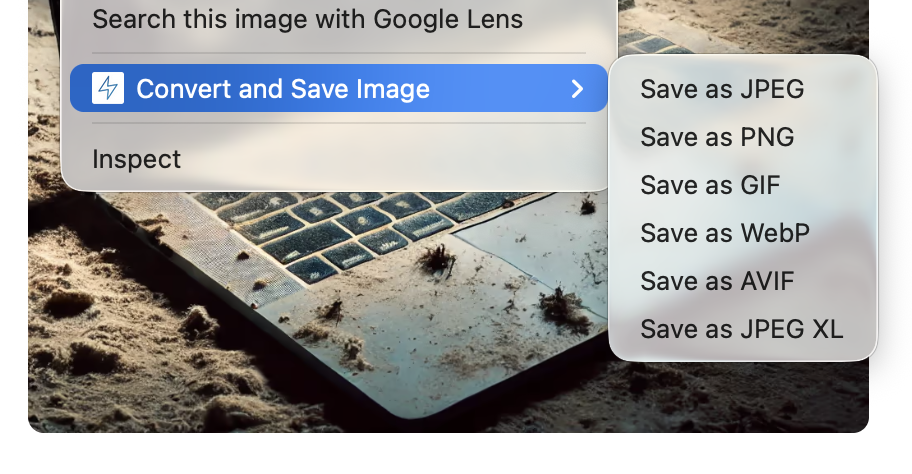
- Choose Convert and Save Image.
- Pick Save as JPG, PNG, GIF, WebP, AVIF, or JPEG XL.
The file downloads in the format you picked, no extra steps. Most conversions run directly on your computer. GIF and some animated conversions are processed by PicPerf’s converter and aren’t stored. It’s free and needs no account, and it’s directly tied to an active brand, which should ease concerns about the extension being turned over to bad-faith stinkers.
Install it from the Chrome Web Store.
Just need one file? Use a converter
If you’d like to avoid loading more software into your browser, PicPerf’s free converters handle one-off files. Drop in an image or paste a URL and you’re done.
- WebP to JPEG — for the classic “Chrome saved a WebP and I need a JPG” moment
- AVIF to PNG — keeps transparency while moving to a universally supported format
- WebP to GIF — for animated images that need to play in apps expecting GIF
Files are processed for the conversion only and never stored.
This is one of those in-between problems that’ll fade as the software ecosystem adapts & catches up. Until then, grab the extension if you hit it a lot, use a converter for the one-offs, and if you find a file that won’t convert right, let me know here or on X.
Ready to upgrade your site's image performance?